Connect your Gmail or Outlook and wake up to replies already drafted — in your voice, in your thread, ready to send.
Connect your inbox, let Ellie learn your voice, and wake up to drafts already waiting.
One click to link Gmail or Outlook. We read threads to draft replies — we never store your email or train general models on it.
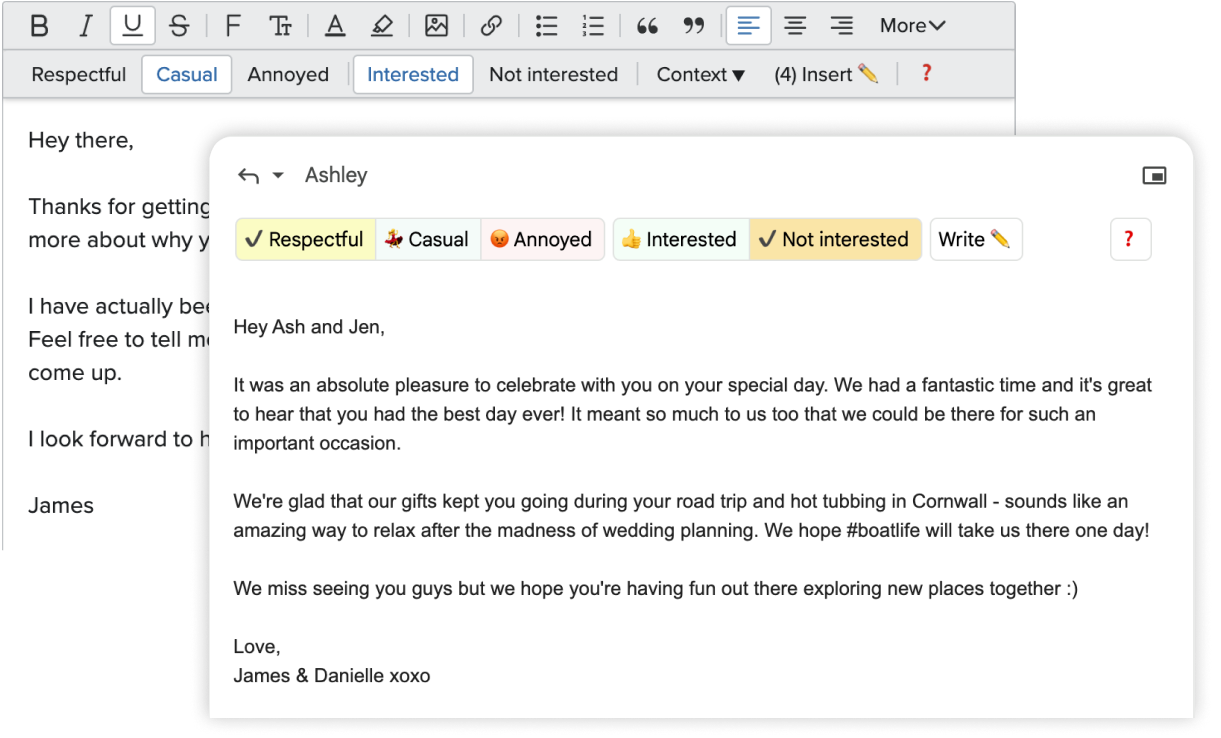
Ellie reads your sent mail and picks up on tone, sign-offs, and the patterns of how you actually write — never the same reply twice.
Every morning, Ellie has already replied to the threads that need a reply. Skim, tweak a word, hit send.
Three things happen, quietly, in the background — so you can stop thinking of email as a thing you have to do.
Ellie reads your sent mail and picks up the small tells that make your writing recognisable — how long your openers run, when you say "cheers" vs "thanks", how you sign off with clients versus friends.
No rigid templates. No identical replies. Just a reflection of the way you already write, scaled to every thread in your inbox.
While you sleep, Ellie reads the threads that actually need a reply and writes drafts for each one. By morning, they're sitting in your drafts folder — in your voice, in the right thread, ready to send.
No prompt to type. No app to open. You just skim, tweak a word, and press send.
Drafts show up as drafts, in the same thread, under the same Gmail or Outlook button. You keep your shortcuts, your filters, your search, your signature.
If you can use email today, you can use Ellie tomorrow.
Ellie isn't just answering in your voice — she's answering with the facts your team would. Connect your help docs and your CRM, and watch the right answer appear in the draft, with the right link, the right number, the right deadline.
Point Ellie at your homepage, your help centre, your pricing page — anything publicly indexable. She'll read it, summarise the policies and product details, and use them when drafting customer replies.
Connect your CRM, your order system, your support tickets — anything with a record per customer. When a reply needs a fact (renewal date, order number, plan tier, ticket status), Ellie pulls it live from the source and weaves it into the draft.
Ellie works through the night so you don't have to. Open your inbox to a full set of ready drafts.
Drafts show up inside your existing inbox — no new app, no new workflow. Just the same Gmail or Outlook you already use.
I used to spend my first 45 minutes of every day on replies. Now Ellie's done that before I sit down — I just skim and send.
It's the first thing I've used that genuinely sounds like me. My team can't tell which emails I wrote myself anymore — and I mean that as a compliment.
The fact that it lives inside Gmail and doesn't ask me to change how I work is the whole reason I stuck with it.
No, Ellie doesn't access your emails. You can provide Ellie with some example email data so that the AI will match your style better, and when replying to a thread Ellie will read the most recent replies so that it can generate some context and create the most relevant reply.
The fastest way is to connect your Gmail or Outlook in our webapp — Ellie will start drafting replies into your Drafts folder automatically. You can also install the browser extension (Chrome, Edge, Firefox) or the native Outlook desktop add-in if you'd rather trigger replies on demand. See the downloads page for all options.
Auto-drafts via connected accounts work for Gmail, Google Workspace, Outlook.com, Microsoft 365, and Exchange Online. The browser extension covers Gmail Web and Outlook on the web. The Outlook desktop add-in (on Microsoft AppSource) covers classic Outlook for Windows, the new Outlook desktop apps, and Outlook on the web.
For other clients (Apple Mail, Fastmail, etc.), use the extension's popup to generate a reply and paste it in. Full guides at help.tryellie.com.
Sorry! Training AI and generating content costs a fair amount of money. We're a small team without external funding so we have to charge for our work!
You can sign up for one of our paid plans to get more replies!
We think that there is a power imbalance in email. Although its one of the most useful inventions of all time, as a single email user, you have no control over who can email you, or what they can put in front of you to briefly grab your attention.
There's almost no penalty for sending mass-emails to as many people as possible, most of which are a complete waste of time and energy.
At least by using Ellie we can claw a small amount of power back, by automating our replies to these automated emails, so that they can no longer monopolise our time.
Others are also using Ellie to overcome reply anxiety, or as a tool to help with dyslexia or language & grammar skills.
If you're using Ellie in an interesting way, please let us know! We'd love to hear about it!
You can provide Ellie with documents or URLs. Ellie will read the documents and crawl the URLs to learn the information.
If Ellie thinks that some of the information that it has learned is relevant to the email it's currently replying to, then it will intelligently include that information in it's reply.
We believe everyone has a fundamental right to the privacy of their data (and have built a product already on that premise).
Your email replies are only used by Ellie to generate a response. We don't store the email data and promise to never share, sell, or do anything shady with your data.
The reason we can promise this is because we're independent developers, with no investment or other outside funding. We survive by building cool products and getting cool people to pay for them, and don't need to sacrifice our ethics!