Connect GitHub. Ellie drafts your help centre with real screenshots of your app, then fixes articles when you ship.
No card · Sign up with Google, Microsoft, GitHub or email
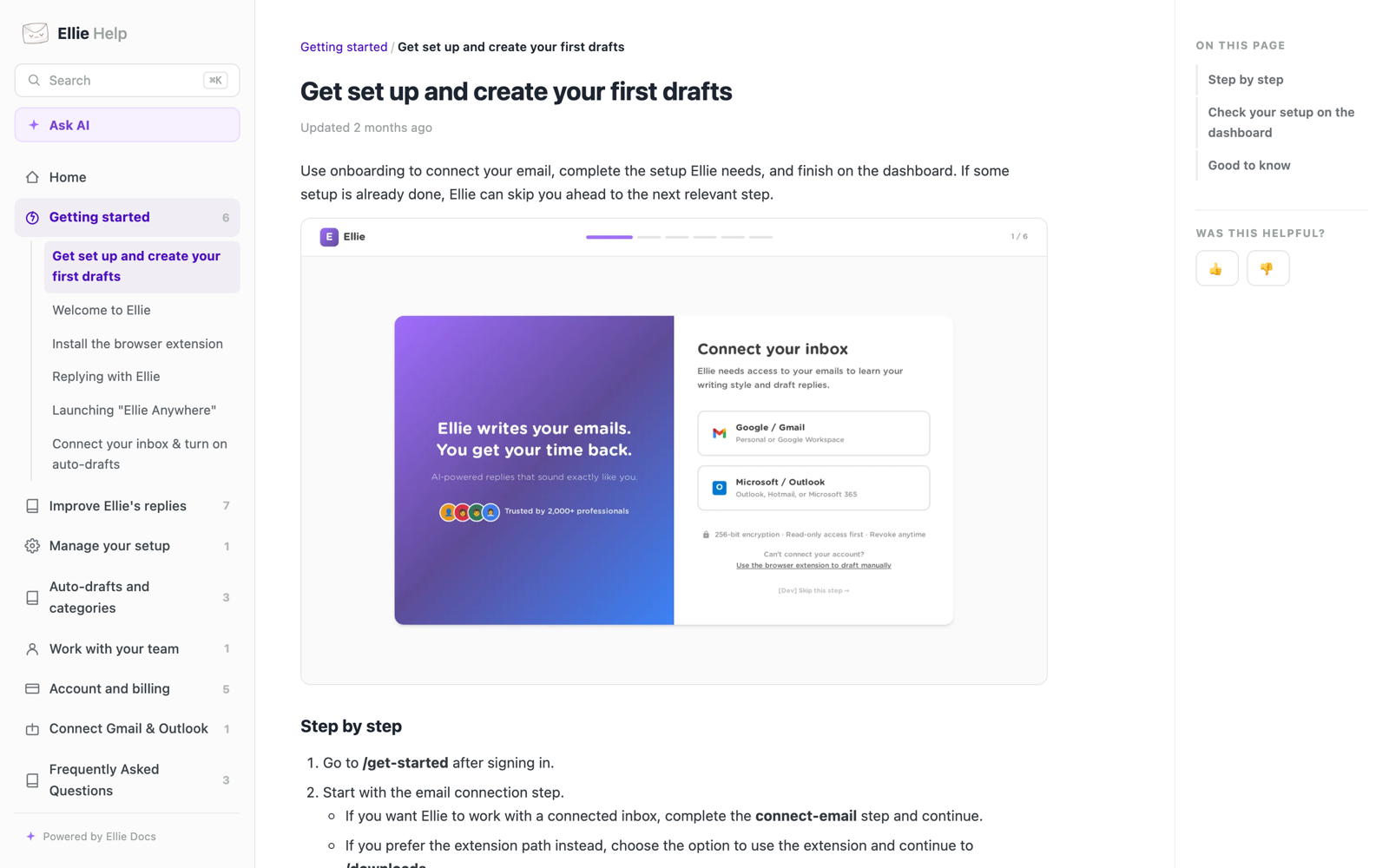

WHAT ELLIE DOCS DOES
Articles drafted from your code, with screenshots of your real app. Hosted on your own domain.
Every merged PR is checked against your articles. When one goes stale, Ellie drafts the fix.
Ask AI on every help centre, answering only from your published docs. Plus instant search.
Release notes drafted from what you merged, with anything unreleased held back.
Got an API? Ellie also publishes an API reference, even if you've never written a spec.
HOW IT WORKS
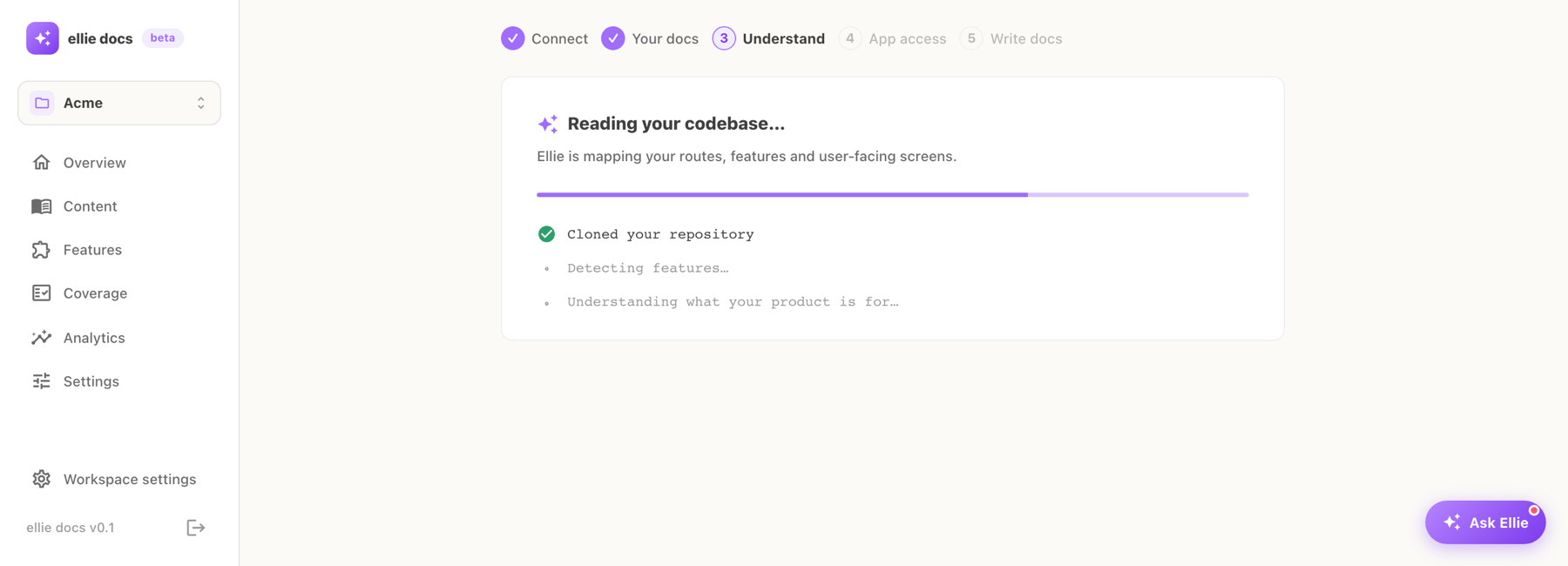
It maps routes and features, works out what your product is for, and captures logged-in screenshots in a sandbox.
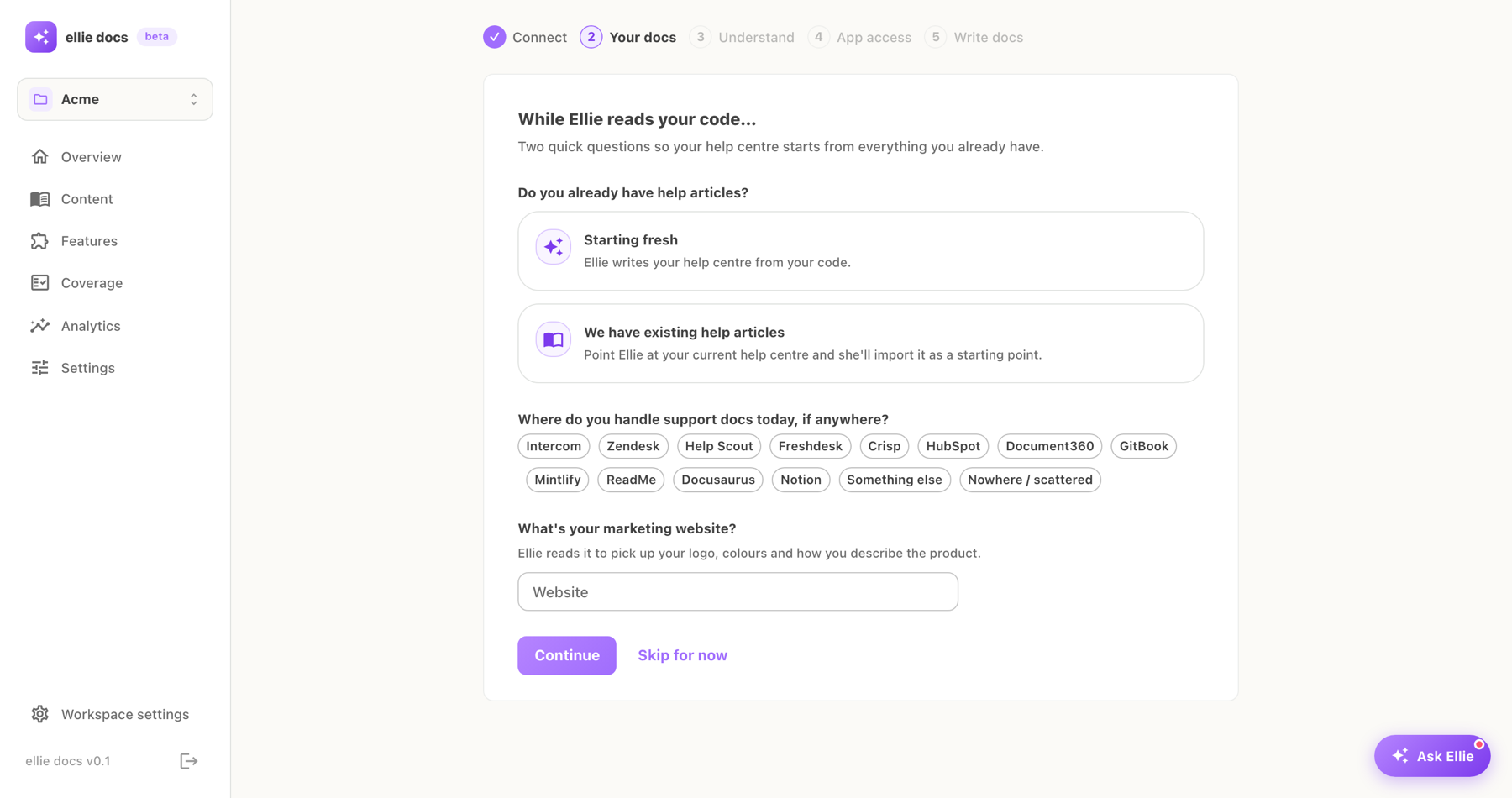
Point it at your current help centre. Every article arrives as an editable draft, so you start from your own words.
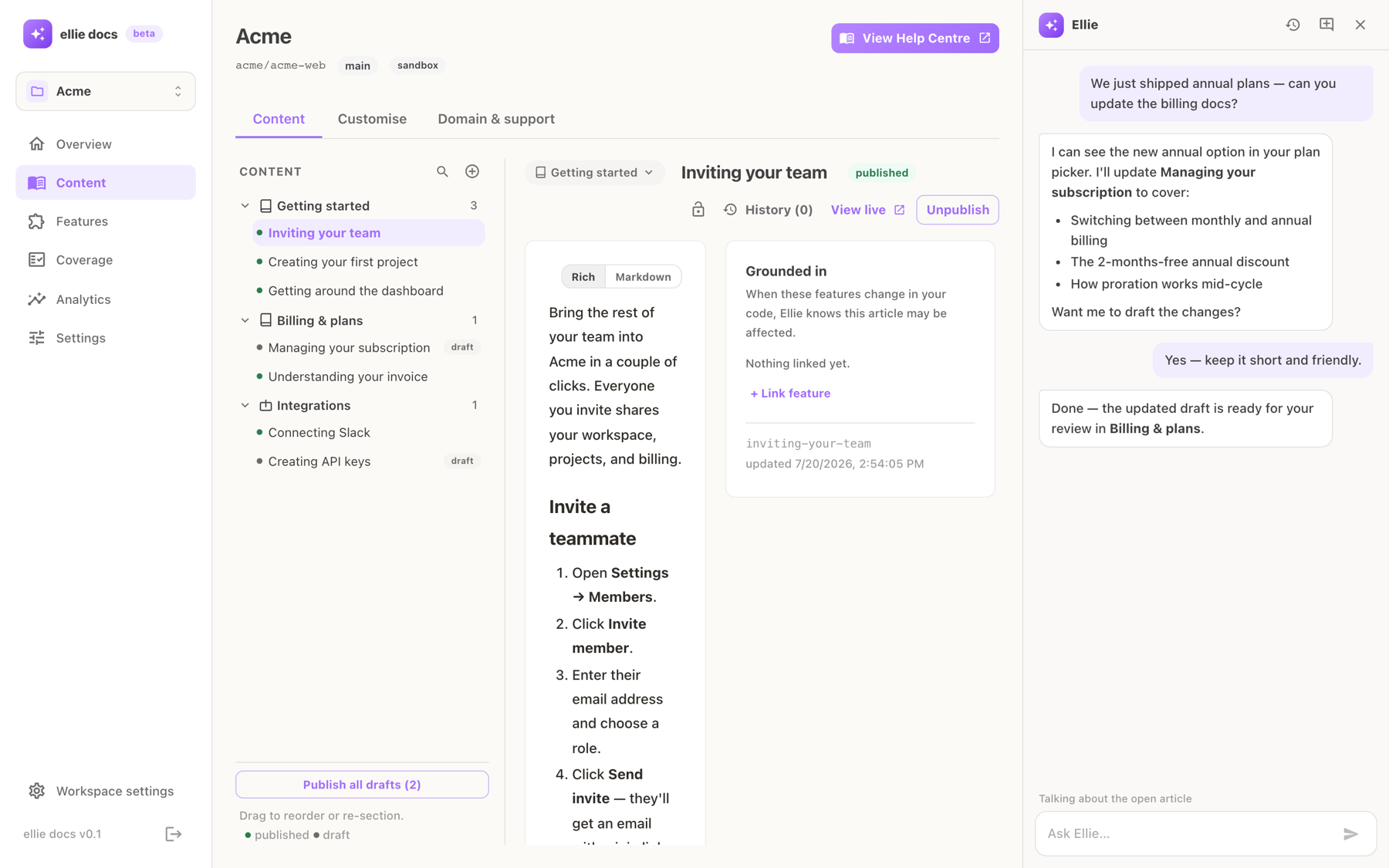
A real editor with callouts, images and video, plus a chat that drafts changes for your review.
Each merged PR is judged against your articles. When one goes stale, Ellie flags it with evidence and drafts the fix.
CHANGELOG
Ellie already knows what each PR changed for your customers, so it drafts the entry. You review and publish.
WORKS WITH CLAUDE AND CURSOR
Connect Ellie Docs to your AI assistant over MCP. Ask what a change affects, get the update drafted and review it, without opening the dashboard.
Drafting never changes what readers see. Publishing always needs your explicit yes.
Ellie drafts and you publish. Each draft passes a quality gate that checks it against the code it describes before you see it.
We don't keep a copy of your repository. Secrets are redacted before anything is stored, and your code is never used to train models.
Articles and API details link back to the code they came from, so you can check Ellie's working instead of trusting it.
PRICING
Every plan includes AI answers, the changelog and unlimited editors. No per-seat fees.
Try it on your real repo. Your help centre stays live.
No card needed
Start freeOne product with real customers reading the docs.
$780 billed yearly
Start 14-day trialHelp centre, changelog and API reference for a growing product.
$1,788 billed yearly
Start 14-day trialSeveral products or brands, with a hand on the wheel.
$4,500 billed yearly
Start 14-day trialHelp centre, changelog and API reference bought separately (Ferndesk Pro, Beamer, ReadMe Pro): about $423 a month. Growth: $149.
Prices in USD, plus VAT where applicable. Every paid plan starts with 14 days of Growth, free, no card. If you don't upgrade you drop to Free and your help centre stays live.
COMPARE
| Ellie Docs | Ferndesk | HelpKit | GitBook | Mintlify | Beamer | |
|---|---|---|---|---|---|---|
| Writes help articles from your code | Yes | Yes | No, Notion | No, Git sync | Pro | — |
| Flags stale articles on each merged PR | Yes | Yes | No | No | Pro | — |
| Real screenshots of your logged-in app | Yes | Yes | No | No | No | — |
| Changelog written from merged PRs | Yes | No | No | Manual | Manual | Manual |
| API reference without an OpenAPI spec | Yes | No | No | No | Not listed | — |
| AI answers for your customers | All plans | Yes | $49 add-on | Ultimate, $249 | Pro | — |
| Entry price, billed annually | $0 · $65 | $124 | $15 + $49 AI | $65 per site | $450 | $49 |
| Ellie Docs | Ferndesk | |
|---|---|---|
| Writes help articles from your code | Yes | Yes |
| Flags stale articles on each merged PR | Yes | Yes |
| Real screenshots of your logged-in app | Yes | Yes |
| Changelog written from merged PRs | Yes | No |
| API reference without an OpenAPI spec | Yes | No |
| AI answers for your customers | All plans | Yes |
| Entry price, billed annually | $0 · $65 | $124 |
| Ellie Docs | HelpKit | |
|---|---|---|
| Writes help articles from your code | Yes | No, Notion |
| Flags stale articles on each merged PR | Yes | No |
| Real screenshots of your logged-in app | Yes | No |
| Changelog written from merged PRs | Yes | No |
| API reference without an OpenAPI spec | Yes | No |
| AI answers for your customers | All plans | $49 add-on |
| Entry price, billed annually | $0 · $65 | $15 + $49 AI |
| Ellie Docs | GitBook | |
|---|---|---|
| Writes help articles from your code | Yes | No, Git sync |
| Flags stale articles on each merged PR | Yes | No |
| Real screenshots of your logged-in app | Yes | No |
| Changelog written from merged PRs | Yes | Manual |
| API reference without an OpenAPI spec | Yes | No |
| AI answers for your customers | All plans | Ultimate, $249 |
| Entry price, billed annually | $0 · $65 | $65 per site |
| Ellie Docs | Mintlify | |
|---|---|---|
| Writes help articles from your code | Yes | Pro |
| Flags stale articles on each merged PR | Yes | Pro |
| Real screenshots of your logged-in app | Yes | No |
| Changelog written from merged PRs | Yes | Manual |
| API reference without an OpenAPI spec | Yes | Not listed |
| AI answers for your customers | All plans | Pro |
| Entry price, billed annually | $0 · $65 | $450 |
| Ellie Docs | Beamer | |
|---|---|---|
| Writes help articles from your code | Yes | — |
| Flags stale articles on each merged PR | Yes | — |
| Real screenshots of your logged-in app | Yes | — |
| Changelog written from merged PRs | Yes | Manual |
| API reference without an OpenAPI spec | Yes | — |
| AI answers for your customers | All plans | — |
| Entry price, billed annually | $0 · $65 | $49 |
Entry price is the lowest plan that includes the feature set shown, billed annually, from each vendor's public pricing page on 1 October 2026. Ferndesk offers $75/mo to companies under $1M ARR.
No. Sign up with Google, Microsoft or email, and connect your repo when you're at your laptop.
A full first draft of your help centre, live on yourname.elliedocs.com with AI answers and a changelog page. It stays up as long as you like.
No. You get 14 days of Growth free, then choose a plan or stay on Free. Nothing is deleted if you don't upgrade.
Yes. If the code is in GitHub, Ellie reads it and runs the app, so you don't need to understand the code yourself.
Not by itself. Ellie drafts and you publish. Drafts are checked against the code first, and changelog entries for unreleased work are held back.
One reply from Ask AI on your help centre. Search, page views and drafting don't count. If you reach your limit we'll ask you to upgrade. We never send a surprise bill.
Yes. Point Ellie at your current help centre and every article comes across as a draft, ready to keep, improve or replace.
Connect a repo and read Ellie's first draft of your docs in your first sitting. Free, no card.
Start freePrefer a walkthrough? Book a 20-minute demo