
Generate Documentation From Code: What AI Gets Right and Wrong
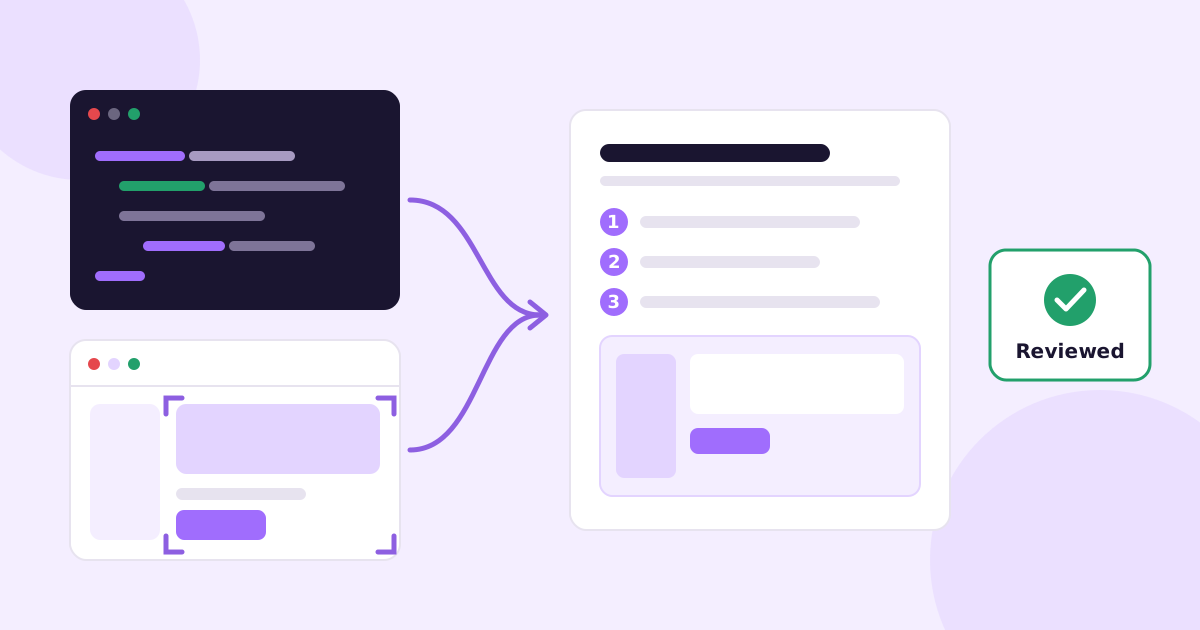
Point a model at a repo, ask for a help center, and you’ll get one. It’ll look finished. Then you read article four and it’s telling your customers about PlanTier.PRO_LEGACY and a screen at /admin/impersonate.
So, can AI generate documentation from code? Yes, and the drafts are useful. AI is good at finding every feature, getting button labels right and producing a consistent first pass. Straight out of the model, though, it reliably gets three things wrong: it leaks internal jargon, it documents screens your users can’t see, and it describes the code instead of the task the user is trying to do. The fix is to ground the drafts in the running app and have a human review everything before it’s published.
Here’s why, and how to set it up so the output is worth shipping.
Two very different kinds of “documentation from code”
People mean two things when they search for this, and it’s worth separating them.
Developer reference docs. API references, SDK docs, function signatures. This is mostly a solved problem and it doesn’t need AI at all. TypeDoc, Sphinx autodoc, Javadoc and OpenAPI tooling like Swagger UI read your code or spec and produce reference pages deterministically. They’re boring and reliable, which is what you want from reference docs.
User documentation. Help center articles for people who will never see your code: “how do I export my invoices”, “how do I add a teammate”. This is the hard one, and it’s where AI documentation generators are now genuinely useful and genuinely risky.
This post is about the second kind. If you need a README or code comments, your coding assistant already does that well enough.
What AI does well when it generates user docs from code
Credit where it’s due. A model reading a codebase is better than a human at a few specific jobs.
It finds everything
Humans write docs from memory, and memory forgets features. The CSV import someone built eight months ago. The keyboard shortcut. The setting that only appears on the team plan. A model reading your routes file, nav components and forms produces a full inventory, and that inventory alone is worth the exercise. Most help centers have gaps nobody knows about.
It gets the exact labels
The button text is right there in the code: "Export CSV", "Send invite". A model will quote it exactly, where a human writes “click the export button” and leaves the reader to guess.
It notices limits and rules
Validation rules live in code. A max length on a project name, a file size cap, a role check that greys out a button. These are exactly the details that generate support tickets (“why can’t I save this?”) and exactly the details a human writer doesn’t know about.
What AI gets wrong when it generates documentation from code
This is the part most tools don’t put on their landing page. In my experience these failure modes show up in nearly every raw AI draft.
1. Internal jargon leaks through
Your code and your UI use different words. The table is workspaces, the UI says “Team”. The enum is PlanTier.PRO_LEGACY, the pricing page says “Pro”. The feature was called smartRouting internally for a year before marketing named it “Auto-assign”.
The model reads the code, so it uses code words. You get sentences like “Create a new workspace (org) from the Teams page”, which is confusing for customers and also wrong. Worse, it leaks names you never meant to be public.
2. It documents screens your users can’t see
A model sees a route and writes an article for it. It has no idea that:
/admin/*is your internal support tooling- the “Bulk import” page is behind a feature flag that’s on for three beta accounts
- the “Teams” settings only render on the Business plan
- that old onboarding flow is dead code nobody removed
So it writes help articles for all of them. Best case, customers go looking for screens that don’t exist for them and email you. Worst case, you’ve published your roadmap, or a how-to for your admin impersonation tool.
3. It describes the code instead of the user’s task
This is the subtle one, and the most common. A model explains what the code does, because that’s what it’s looking at. Users don’t care what the code does. They want to get something done.
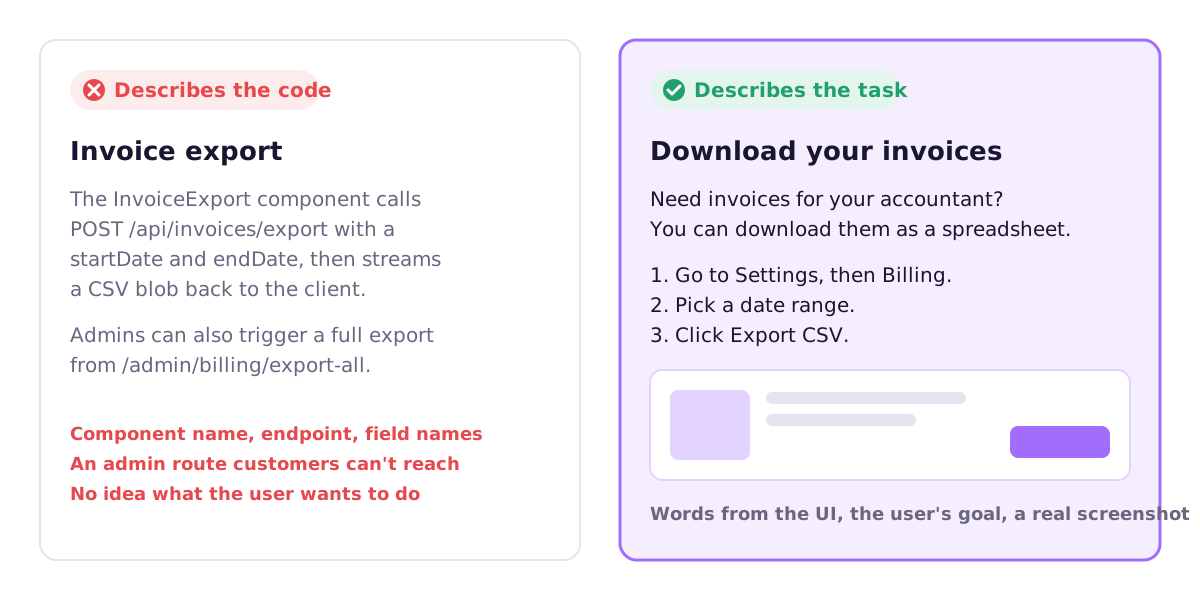
The left version is accurate. It’s also useless to someone whose accountant just asked for last quarter’s invoices. The right version starts from the goal, uses the words on screen and shows where to click. The Diátaxis framework draws this line well: a how-to guide serves a goal, a reference describes the machinery. Raw AI drafts drift towards reference even when you asked for a how-to.
4. It guesses confidently about behavior the code doesn’t settle
Plenty of what users experience isn’t decided by the code alone. Whether a confirmation email actually sends depends on config. What a page looks like depends on the data in it. Your refund policy, your support hours and what happens to data after cancellation usually aren’t in the repo at all.
A model fills those gaps with plausible guesses written in the same confident tone as everything else. That’s the dangerous part: the wrong sentences don’t look any different from the right ones.
Why grounding docs in the running app matters
Code tells you what can exist. The running app shows what a user actually sees.
If you generate documentation from code alone, you’re documenting a theory of your product. Run the app, log in as a normal user on a normal plan, and most of the problems above shrink:
- Admin and flag-gated screens simply don’t appear, so they don’t get documented.
- The labels in the screenshot are the labels customers see, which catches jargon.
- If the article says “click Export CSV” and the screenshot has no Export button, you’ve found a mistake (in the docs or the product) before a customer did.
You can do this yourself with a browser automation tool. A minimal Playwright script that logs in as a demo user and captures a page for an article looks like this:
// docs/capture/billing.spec.ts
import { test } from '@playwright/test';

test('capture billing page for the invoices article', async ({ page }) => {
  await page.goto('http://localhost:3000/login');
  await page.getByLabel('Email').fill('docs-demo@example.com');
  await page.getByLabel('Password').fill(process.env.DOCS_DEMO_PASSWORD!);
  await page.getByRole('button', { name: 'Sign in' }).click();

  await page.goto('http://localhost:3000/settings/billing');
  await page.screenshot({ path: 'docs/img/download-invoices-step-1.png' });
});
The Playwright screenshot docs cover element-only shots and full-page captures. The hard part isn’t the script, it’s having seeded demo data that looks real and a login that works in CI. We go through the whole setup in how to create product screenshots automatically.
Why human review still isn’t optional
Even with good grounding, someone who knows the product has to read every article before it goes live. Not skim it. Read it.
Here’s the checklist I’d give a reviewer:
- Words match the UI. Every feature name, button and menu item is what customers see, not what engineers call it.
- Every screen is reachable. A customer on the plan this article targets can actually get there. Plan-specific features say so.
- It starts from the task. The title is something a user would type into search. The first step is a click, not a paragraph of context.
- Policies are real. Anything about money, data, cancellation or support hours comes from you, not the model.
- Nothing unreleased. No beta features, no internal tools, no names marketing hasn’t announced.
Reviewing a decent draft is much faster than writing from a blank page, which is the whole point. But it’s the step that turns a plausible draft into documentation you’d stand behind. If you skip it, you’re publishing the model’s guesses under your company’s name.
A DIY workflow you can run with your coding assistant
You don’t need a dedicated AI documentation generator to get most of the value. With Cursor, Claude Code, Copilot or similar:
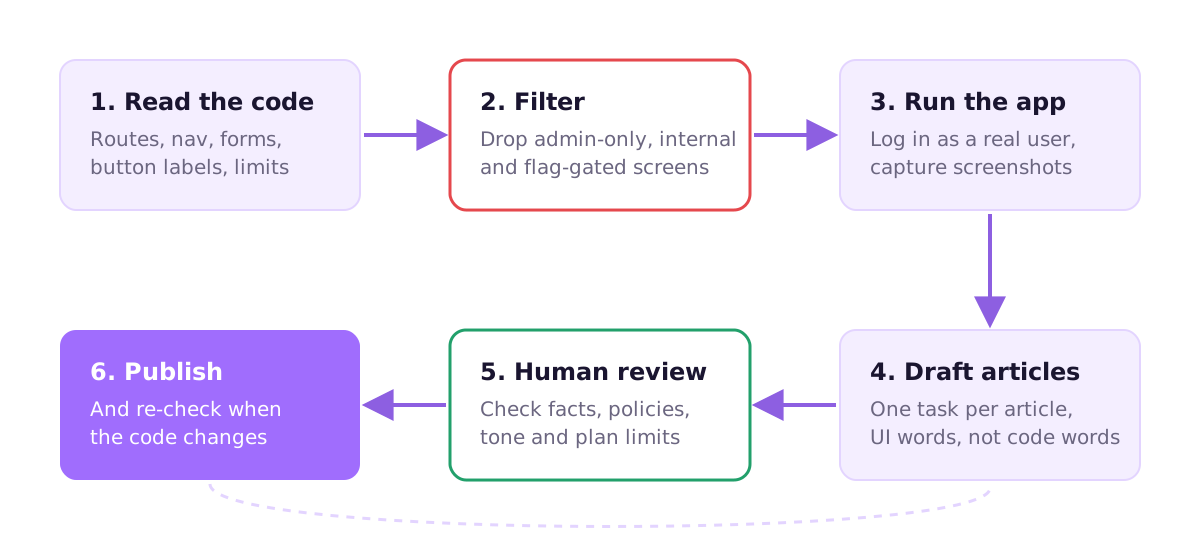
1. Ask for an inventory, not articles. Something like:
List every user-facing feature in this app. For each one give:
- the route or screen where a user finds it
- the exact button/menu labels involved
- any plan, role or feature-flag check guarding it
Do not write documentation yet.
2. Prune it by hand. Strike out admin routes, internal tools, flagged betas and dead code. This takes ten minutes and prevents the worst failures.
3. Give it a glossary. A short list mapping code terms to UI terms (workspace → Team, PRO_LEGACY → Pro). Paste it into every drafting prompt.
4. Draft one task per article. Ask for a how-to written for a non-technical user, using only labels from the inventory, starting with the goal, and flagging any sentence it isn’t sure about with [CHECK].
5. Walk the app and screenshot. Follow each article yourself. Fix what’s wrong, add screenshots.
6. Review against the checklist above, then publish. Structure-wise, how to write help center articles people actually use has a template that works well here.
The weakness of the DIY route is step 7, which doesn’t exist yet: noticing when next week’s code change makes article twelve wrong. That’s a separate problem, covered in how to keep documentation up to date.
How Ellie Docs handles this
We built Ellie Docs around the failure modes above, so here’s how it lines up.
It reads your repo and maps features and user-facing screens, then drafts a help center organized by what users do.
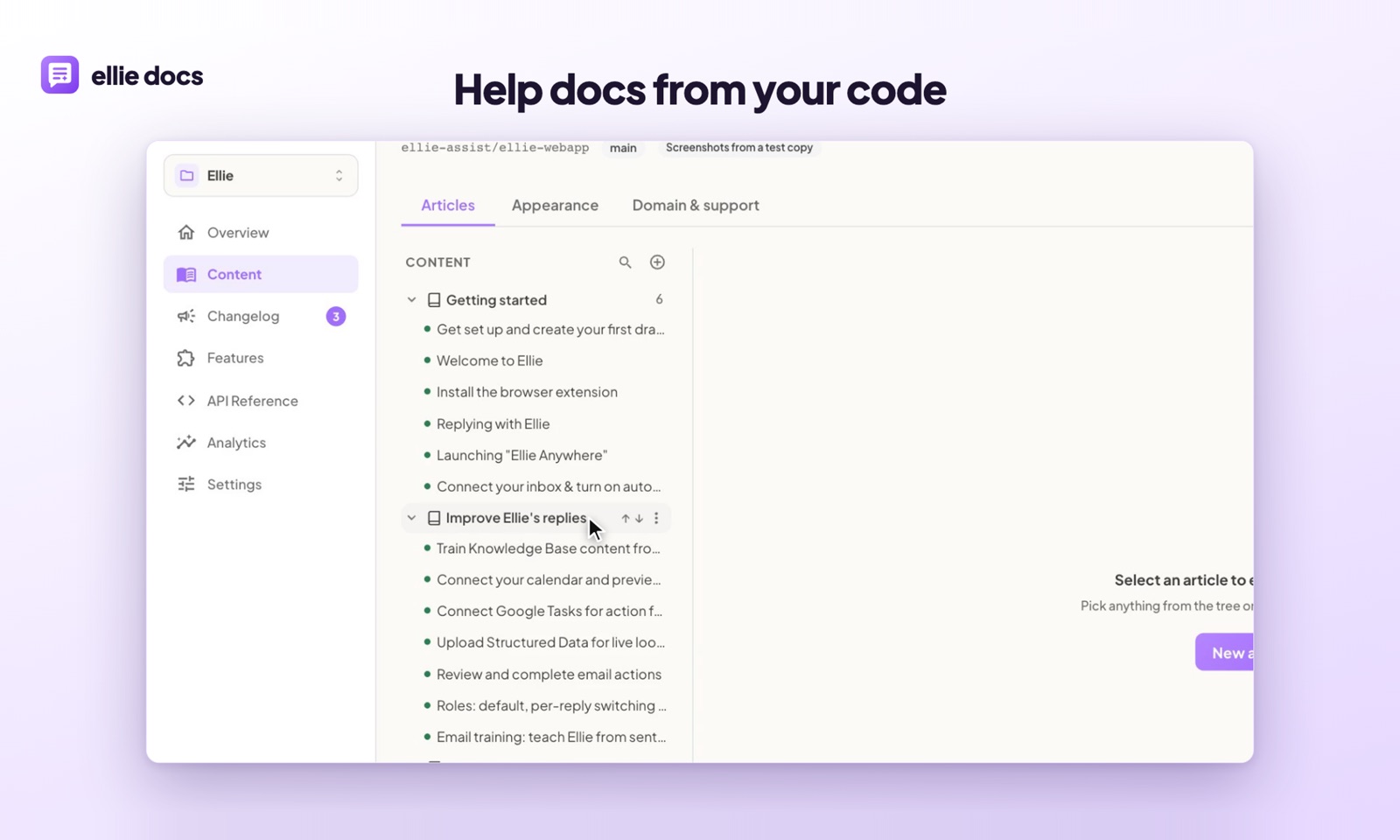
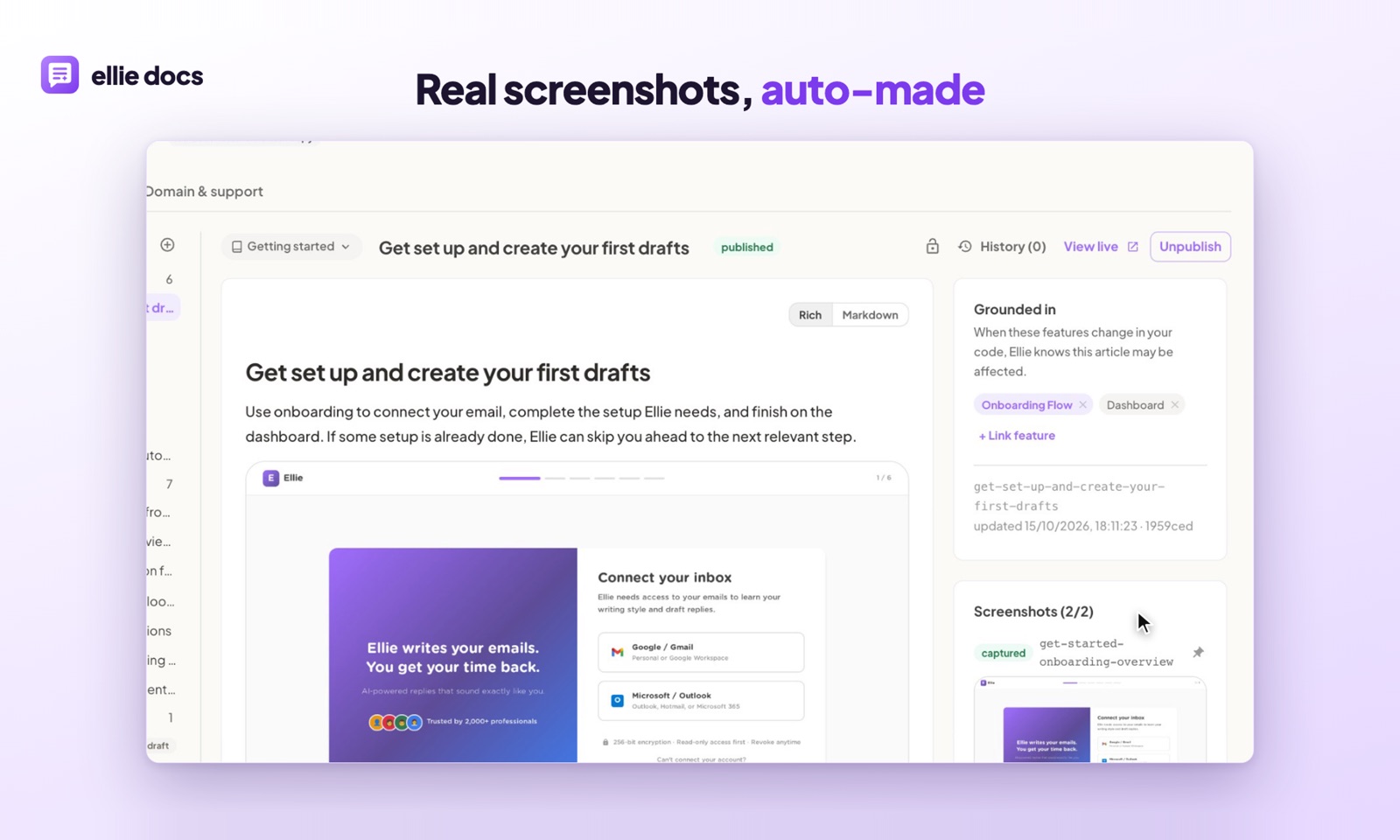
It runs your app in a sandbox and captures real screenshots of the logged-in product, placed in the articles. Each article shows which features it’s grounded in, so when those features change in the code, Ellie knows the article may be affected.
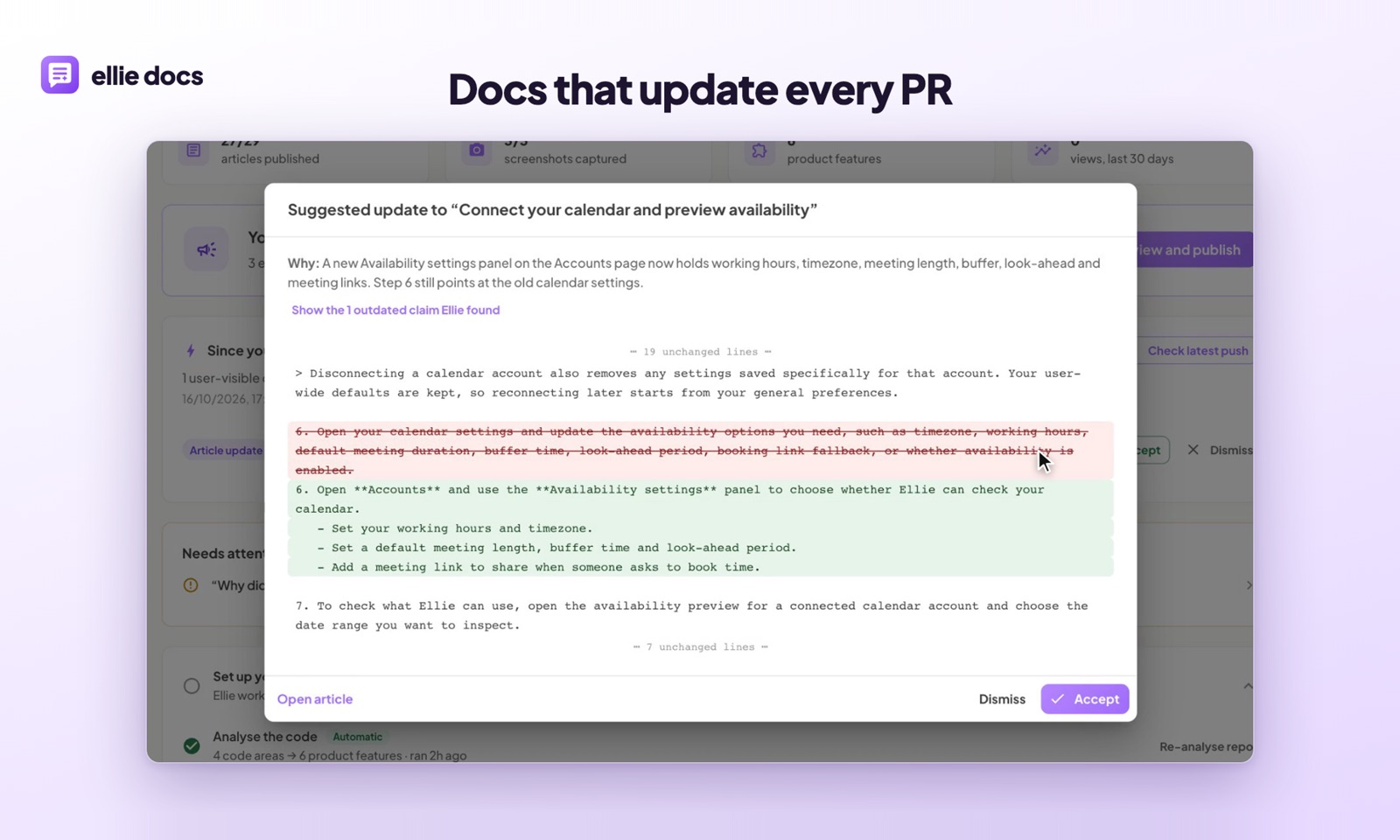
On every merged PR it checks which articles the change touches and proposes edits as a diff you accept or dismiss. When it writes your changelog from merged PRs, it holds back entries for unreleased or flag-gated work. Nothing publishes on its own. You publish.
It still gets things wrong sometimes. It can’t know your policies, and it’ll occasionally pick a code word over a UI word. That’s why every draft and every suggestion goes through you. If you’re working on an app built with an AI builder, the guide to documenting a vibe-coded app covers the extra wrinkles there.
A few questions people ask
Is there a free AI documentation generator? Your coding assistant plus the DIY workflow above costs nothing extra. Ellie Docs also has a free plan with no card required, if you’d rather have the screenshots and update tracking handled.
Can AI generate API docs without an OpenAPI spec? It can, by reading your route handlers. If you already have a spec, use standard tooling like Swagger UI or Redoc; it’s deterministic and free. Ellie Docs generates an API reference from code without a spec on its Growth plan, which helps if you never wrote one.
Should I let AI publish documentation automatically? No. Let it draft and propose. A person who knows the product should approve anything customers will read, especially anything about billing or data.
Will AI-written docs be accurate? As accurate as the grounding and the review behind them. From code alone, expect a useful draft with confident mistakes. Grounded in the running app and reviewed by someone who knows the product, they can be better than what most teams write by hand, mostly because they cover features humans forgot.
If you want drafts grounded in your real app, with screenshots and PR-by-PR suggestions you approve, try Ellie Docs free. Connect a repo and review your first drafted help center today.