
AI Customer Support Replies That Don't Sound Like a Bot
Everyone has had the reply. “Thank you for reaching out! We apologize for any inconvenience. Have you tried clearing your cache?” You told them in the first line that you’d already cleared your cache. Now you’re more annoyed than when you started.
That’s what most people picture when they hear “AI customer support”. And it’s fair, because a lot of it is like that.
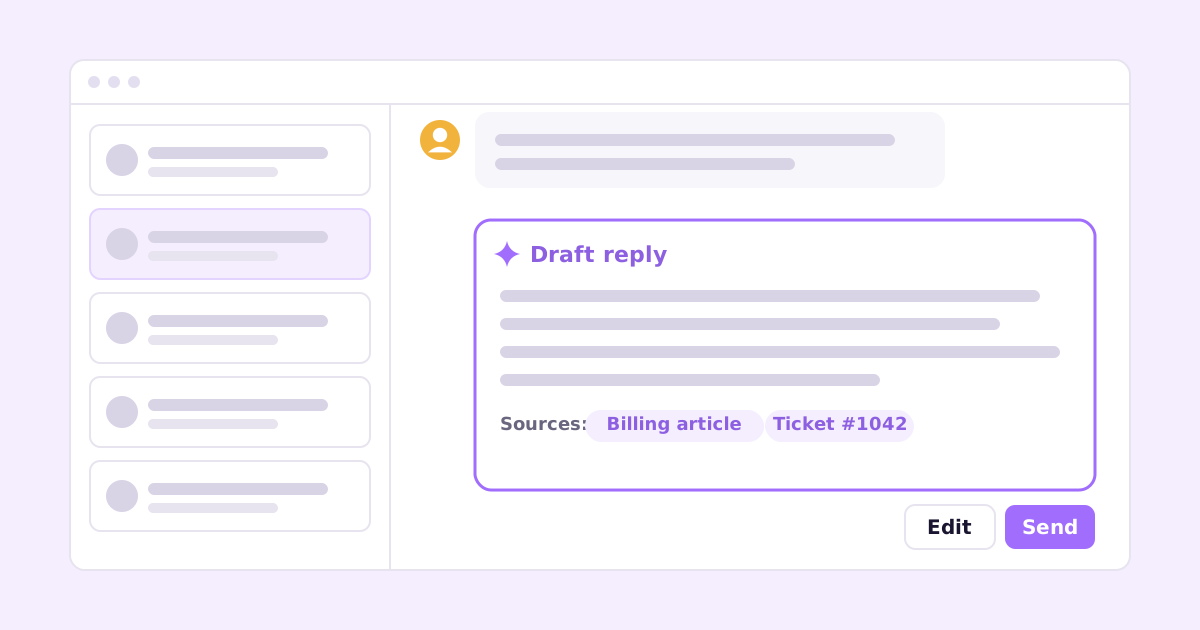
It doesn’t have to be. AI customer support replies sound human when three things are true: the draft is grounded in real facts (your help docs, past answers, the customer’s account), it answers the specific question that was asked, and a person reviews it before it goes out. Get those right and AI saves you a lot of typing without your customers ever feeling handled by a machine. Get them wrong and you’ve automated the worst kind of support.
Here’s what that looks like in practice, with a real-looking example.
Why AI support replies sound robotic
The robotic tone isn’t really a writing problem. It’s a knowledge problem.
When a model doesn’t know the answer, it fills space. Apologies, thanks for reaching out, generic troubleshooting steps, “let us know if the issue persists”. That padding is what a language model produces when it has nothing specific to say. Tone instructions (“be friendly and concise!”) don’t fix it, because the model still has nothing specific to say.
The other common causes:
- It ignores what the customer already told you. They said they tried two browsers. The reply suggests trying another browser.
- It’s written for everyone. No name, no plan, no reference to their actual data.
- It doesn’t commit. “This may be caused by a number of factors.” Which one?
- It ends nowhere. No next step, no offer, just “hope this helps!”
Fix the knowledge and most of the tone problems go away on their own.
An example: the same email, two drafts
Here’s a support email for a made-up analytics product. It’s typical: a bit frustrated, includes what they’ve tried, and the real cause isn’t something they could know.
From: Dana Subject: Export keeps failing
Hi, I’m trying to export our Q3 report to CSV and it just stops partway through. I’ve tried Chrome and Safari and cleared my cache. We need this for a board meeting on Thursday. Is something broken?
The generic bot reply
Thank you for reaching out! We apologize for any inconvenience this may have caused.
Exports can fail for a number of reasons. Please try clearing your browser cache and cookies, or try using a different browser. You may also want to check your internet connection.
If the issue persists, please don’t hesitate to let us know and our team will be happy to assist you further!
Every sentence is technically fine. The whole thing is useless. It repeats things Dana already did, doesn’t explain anything, and pushes the problem back to her two days before her deadline.
A grounded reply
Now say the AI drafting this has access to three things: your help article on export limits, Dana’s account (she’s on the Basic plan), and the size of the report she tried to export (about 14,000 rows).
Hi Dana,
Nothing’s broken, but I can see why it looks that way. Exports on the Basic plan stop at 10,000 rows, and your Q3 report has about 14,000, so it cuts off partway.
Two ways to get it done before Thursday:
- Filter the report by date (July to mid-August, then the rest) and export twice. Each half will be under the limit.
- I can turn on a Team plan trial for your workspace, which lifts the limit to 100,000 rows, and you can export in one go.
Want me to switch on the trial? Takes me a minute.
Fraser
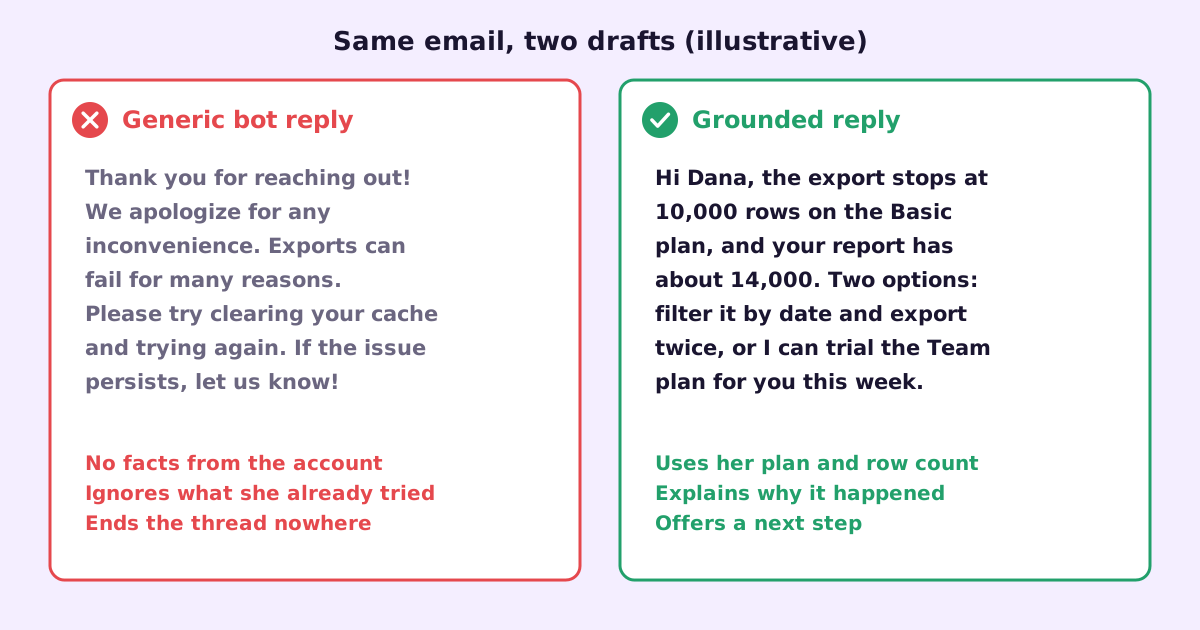
Same model, same customer, completely different reply. The difference is that the second draft had facts to work with. It knew the limit, knew her plan, knew her row count, and knew what options exist. So it could explain why, offer a fix, and respect her deadline.
That’s the whole game.
How grounded AI support replies work
The pattern behind good AI helpdesk tools is called retrieval-augmented generation, but you don’t need the jargon. It means: before writing, the system looks things up.
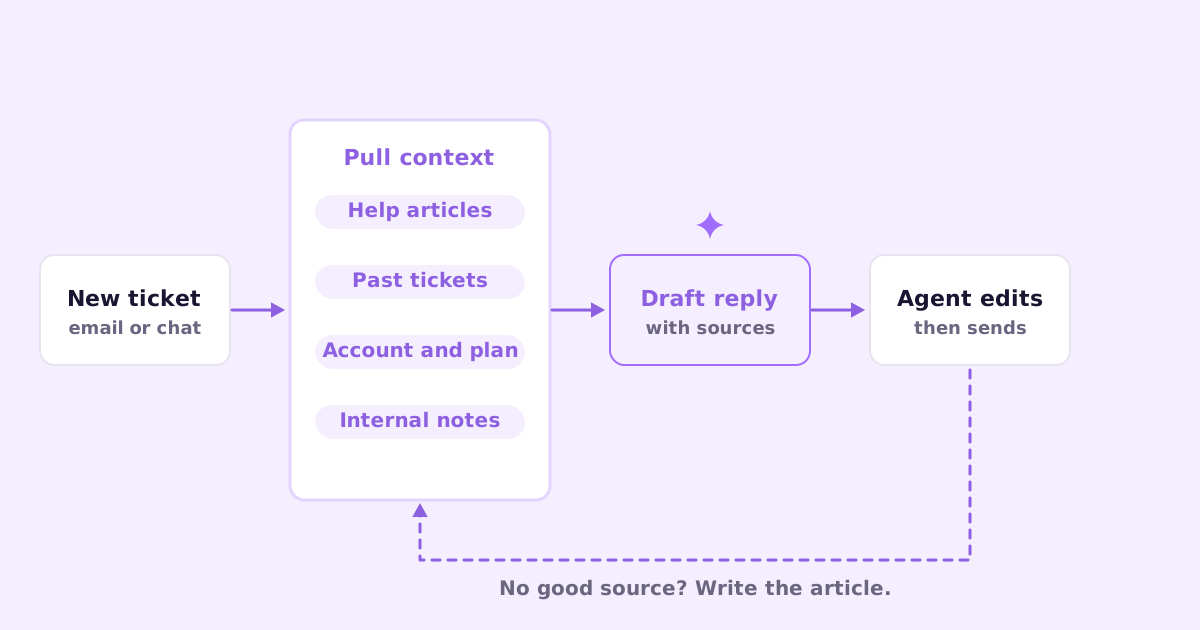
The sources that matter most, in rough order:
- Your help center articles. The official answer to common questions. If your docs say the export limit is 10,000 rows, the draft says 10,000 rows.
- Past resolved tickets. How your team actually answered this kind of question before, including workarounds that never made it into the docs.
- The customer’s account. Plan, usage, recent errors, what they’ve already been told. This is what makes a reply personal instead of generic.
- Internal notes and policies. Refund rules, known bugs, things you’d tell a new support hire on day one.
A good AI support tool also shows its sources. When a draft says “Basic plan exports stop at 10,000 rows”, you should be able to see which article that came from. That’s how you catch the draft that’s confidently citing last year’s pricing.
Why you should keep a human in the loop
There’s a strong pull toward fully automatic replies. They’re cheaper, and they’re instant. For a small set of truly simple questions (“where’s my invoice?”) with a reliable source, they can be fine.
For everything else, I’d keep a person between the draft and the send button. A few reasons:
- The model will sometimes be wrong. Confidently. Usually because a doc is out of date or a past ticket was answered badly.
- Some emails aren’t what they look like. “How do I export my data?” is sometimes a churn signal. A person notices. A bot answers the question.
- Tone needs judgment. A frustrated customer with a deadline needs a different reply than a curious one browsing on a Sunday.
- Reviewing teaches you things. When you keep editing the same kind of draft, that tells you a doc is missing or wrong.
The time savings from AI drafting are still large even with review. Editing a good draft takes far less time than writing from scratch. You’re checking facts and adjusting tone, not composing.
Practical rules for AI helpdesk drafts that sound like you
If you’re setting this up, whether with a tool or your own prompts, these rules make the biggest difference:
Feed it facts before you feed it style. A style guide on top of no knowledge produces polite nonsense. Get your help center accurate first.
Ban the filler. Tell it explicitly: no “thank you for reaching out”, no “we apologize for any inconvenience”, no “don’t hesitate to”. Start with the answer.
Make it use what the customer said. If they listed what they tried, the reply must not suggest those things again.
Require a next step. Every reply ends with something concrete: a link, an offer, a question that moves things forward.
Let it say “I don’t know”. A draft that says “I couldn’t find anything on this, flagging for a human” is far better than a guess. Grounded tools should refuse rather than invent.
Sign as a person. If a person reviewed and sent it, it’s from that person. That’s honest, and it reads better.
Show sources to the agent, not the customer. Citations help the reviewer check facts. The customer just wants the answer.
When AI support replies go wrong (and what to do)
A few failure modes I’d watch for:
- Stale docs. The AI is only as current as what it reads. If your docs describe a feature you removed last month, drafts will too. If this is your weak spot, read how to keep documentation up to date.
- Copying a bad past answer. If someone once gave a wrong workaround, retrieval can surface it again. Archive or fix bad tickets.
- Over-sharing account data. The draft should use account details to help, not recite them. “Your report has about 14,000 rows” is helpful. Listing someone’s billing history isn’t.
- Leaking between customers. Make sure past-ticket retrieval never quotes one customer’s details to another. Any tool you pick should be clear about this.
Where the drafts get better over time
Here’s the part people miss. The best way to improve AI support replies isn’t prompt tweaking. It’s improving the knowledge base.
Every time a draft is weak because the answer wasn’t documented, that’s a missing help article. Write it, and the next draft on that topic will be good, and some customers won’t need to email at all. I wrote up the process in turning support tickets into help articles, and the wider picture in how to reduce support tickets without hiring.
That’s the loop we’re building around. Ellie Docs writes and maintains your help center from your codebase, so the facts stay current when you ship. Ellie Desk is a shared inbox for email, chat and a web widget that drafts replies grounded in those docs, your past tickets and your knowledge base. You review, edit and send. And when a ticket gets resolved, one click turns it into a draft help article. Desk is in early access.
There are plenty of other options too. Intercom, Zendesk, Help Scout and Front all have AI drafting or answer features now, with different approaches to grounding and automation. Whatever you choose, ask the same questions: what does it read, does it show sources, and can a human review before sending?
Questions people ask about AI customer support
Will customers know the reply was drafted by AI? Not if it’s grounded and reviewed. They notice generic replies, not AI ones. A specific, correct answer signed by a real person reads like good support, because it is.
Should AI replies be sent automatically? For a narrow set of simple, well-documented questions, it can work. For anything involving money, bugs, frustration or judgment, keep a person reviewing. The drafting is where most of the time saving is anyway.
What do I need before AI drafting is worth it? An accurate help center for your most common questions, and enough past tickets for the system to learn your answers from. If your docs are thin, start there.
If you want a support inbox where AI drafts the reply from your own docs and past answers, and you just check and send, join the Ellie Desk early-access list.