
How to Reduce Support Tickets Without Hiring Another Person
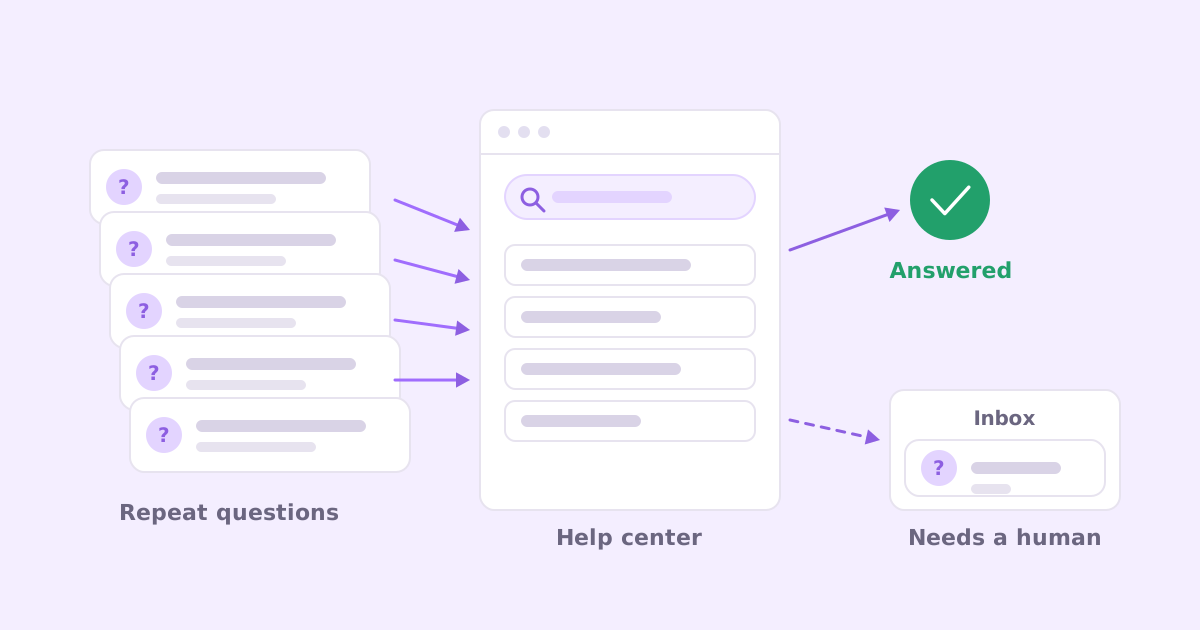
You open the support inbox on Monday and there are 40 new conversations. You skim them. At least a dozen are some version of “how do I reset my password”, “can I get a copy of my invoice” or “how do I add my colleague”. You answered every one of those last week too.
That’s the real problem. Not volume. Repetition.
If you want to reduce support tickets without hiring, the order of operations is simple: find out which questions repeat, fix the product where the product is the cause, write a findable answer for the rest, and put that answer where people look before they email you. Then make it a habit so every new kind of ticket gets the same treatment. None of this needs a bigger team. It needs a couple of hours a week and a bit of discipline.
Here’s how I’d do it, in the order that pays off fastest.
Why ticket volume grows faster than your customer count
Most small SaaS teams expect support to scale with signups. It usually scales a bit faster, for a few boring reasons:
- Every feature you ship adds questions. New settings, new limits, new edge cases.
- Your help content goes stale. The screenshot shows last year’s sidebar, so people give up and email.
- Answers live in people’s heads. You know the workaround for the CSV import. Your customers don’t, and neither does the person you just hired.
- Nobody closes the loop. A ticket gets answered, the customer is happy, and the next person with the same question starts from zero.
The last one is the one to fix. A support inbox where every answer disappears into a thread is a machine for answering the same question forever.
Step 1: Audit your tickets before you change anything
You can’t deflect what you haven’t counted. Before writing a single help article, spend an hour with the last 30 days of tickets.
Export them, or just scroll. For each conversation, write a short topic label in a spreadsheet. Keep the labels blunt: “password reset”, “invoice copy”, “invite teammate”, “CSV import fails”, “cancel plan”. Don’t overthink categories, you’re looking for clumps.
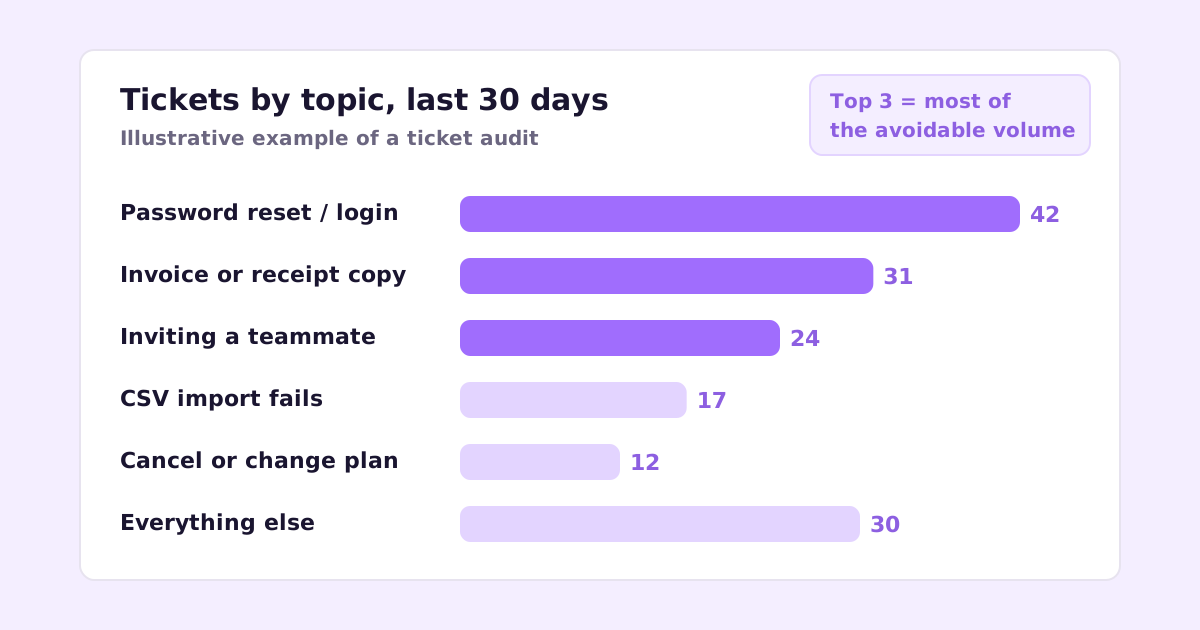
When you sort by count, you’ll almost always see the same shape: a handful of topics make up a big share of the volume, then a long tail of one-offs. The numbers above are made up, but the shape isn’t unusual.
For each of the top topics, ask one question: is this a product problem or a knowledge problem?
- Product problem: the customer did nothing wrong and the product made it hard. A password reset email that lands in spam. An invoice that’s only available by asking.
- Knowledge problem: the product works, the customer just doesn’t know how. Inviting a teammate is in Settings, they looked under Account.
That split decides what you do next.
Step 2: Fix the product causes first
This is the part most “ticket deflection” advice skips, because it’s not about support tooling at all.
If people email you for invoices, the best help article in the world is worse than a “Download invoice” button on the billing page. If password resets keep failing, look at your email deliverability before you write “check your spam folder” in an FAQ.
A few fixes that tend to remove whole categories of tickets:
- Self-serve billing. Invoice downloads, plan changes, card updates, cancellation. If any of these require emailing you, expect tickets. (If you use Stripe, the hosted customer portal covers most of it.)
- Better error messages. “Import failed” generates a ticket. “Row 214 has a date in the wrong format, expected YYYY-MM-DD” usually doesn’t.
- Empty states that explain. The first time someone opens a blank screen, tell them what goes there and how to fill it.
- Sensible defaults. If most people change a setting on day one, maybe the default is wrong.
You won’t fix everything this way. But every product fix is permanent, and it costs you nothing every month after.
Step 3: Write help articles for the questions people actually ask
For whatever’s left on your top list, you need an answer that a customer can find in under a minute. That’s what people mean by self-service support: the customer gets the answer without waiting on you.
A few rules that make a big difference:
Title articles with the customer’s words, not yours. If tickets say “how do I add my colleague”, the article is called “How to add a teammate”, not “Workspace member provisioning”. People search with their own vocabulary.
One question per article. “Billing FAQ” with 14 questions is hard to search and hard to keep current. “How to download an invoice” is easy to find and easy to update.
Lead with the answer. First line should be the fix. Background can come after.
Use real, current screenshots. If the screenshot doesn’t match what they see, they’ll stop trusting the whole page and email you instead.
If you want a template for this, I wrote a separate guide on how to write help center articles people actually use, including an outline you can copy.
The hard part isn’t writing the first ten articles. It’s keeping them accurate when you ship every week. Outdated docs generate their own tickets (“your guide says click Export but there’s no Export button”). There’s a whole post on keeping documentation up to date if that’s where you’re stuck.
Step 4: Put the answer where the question happens
A great article nobody finds deflects nothing. Ticket deflection mostly comes down to placement.
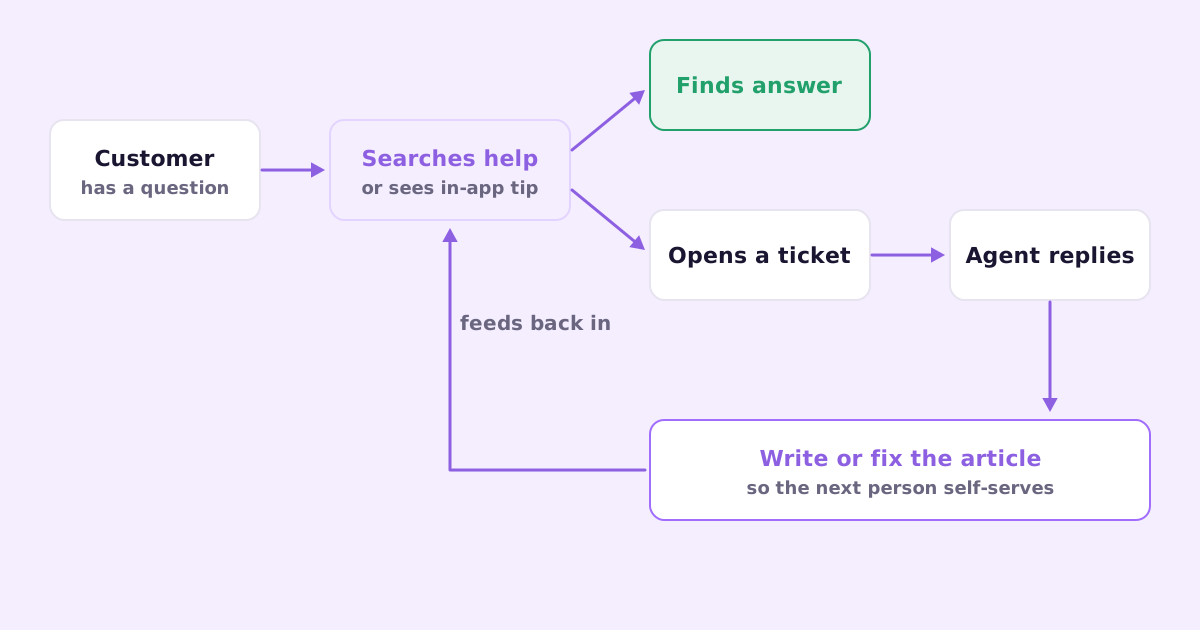
Places that actually work:
- Inside the product, next to the feature. A small “How does this work?” link on the import screen beats a help center link in the footer.
- On the contact form. As someone types their subject line, suggest matching articles. Some will leave satisfied. Don’t hide the “send anyway” button, though. Making people fight to reach a human creates angry tickets instead of fewer tickets.
- In your chat widget. Most widgets can search your help center before routing to a person.
- In onboarding and transactional emails. The welcome email can link the three articles new users need most. The “payment failed” email can link the “update your card” article.
- In your replies. When you answer a ticket, link the article. The customer learns where answers live, and you find out fast if the article is unclear.
Should you use an AI chatbot for ticket deflection?
Maybe, with care. A bot that answers from your help center can resolve the simple questions at 2am. A bot that guesses, or that traps people in a loop of “did this answer your question?”, makes things worse and annoys the customers who most need a person.
My rule: a bot should only answer from content you’ve written and checked, it should say when it doesn’t know, and there should always be an obvious way to reach a human. If your help center is thin, fix that first. A bot can’t be better than the content it reads.
Step 5: Stop answering the same question twice
This is the habit that keeps the numbers going down instead of creeping back up.
Every time you answer a question that isn’t covered in your help center, you’ve just written most of an article. The customer described the problem in their own words, you wrote the fix. Turning that into a public article takes five minutes if you do it right away and never happens if you leave it for “later”.
A simple version of the habit:
- When you resolve a ticket, ask: would someone else ask this?
- If yes and there’s no article, draft one from your reply. Strip the customer’s details.
- If there’s an article but the customer didn’t find it, fix the title or add the words they used.
- Once a week, look at what’s new in your ticket tags and check the top three have answers.
I go into the mechanics of this in turning support tickets into help articles, including how to structure the article from the ticket thread. The method has a name in bigger support orgs, Knowledge-Centered Service, but you don’t need the formal framework to get most of the benefit.
Step 6: Make the tickets that remain faster to answer
Some tickets should reach you. Bugs, edge cases, angry customers, people about to churn, people about to upgrade. You don’t want to deflect those, you want to answer them well and quickly.
A few things that help a small team keep up:
- Saved replies for the common middle. Not robotic templates, just a solid starting point you personalize. “Thanks for the report, can you send the steps to reproduce and a screenshot?” gets typed a lot.
- Tags on everything. Two seconds per ticket, and next month’s audit takes ten minutes instead of an hour.
- One owner per conversation. If two people share an inbox with no assignment, you’ll get double replies and dropped threads. There’s a whole post on shared inbox vs helpdesk for when to move off plain email.
- AI-drafted replies, reviewed by a person. A draft grounded in your help articles and past answers gets you most of the way, and you edit before sending. I wrote about using AI for support replies without sounding like a bot, with a worked example.
How to know it’s working
Don’t obsess over a single deflection number. Watch a few simple things over a couple of months:
- Total tickets per active customer. Going down is the goal, even if total tickets go up because you’re growing.
- Tickets in your top five topics. These should shrink first.
- Help center searches with no results. Each one is a missing article.
- Articles with lots of views that still lead to a ticket. Those articles are unclear or wrong.
If tickets per customer go down and the tickets you do get are harder and more interesting, that’s success. Support is supposed to be where you learn about edge cases, not where you retype the password reset steps for the hundredth time.
Tools that help (and the ones you don’t need yet)
You can do everything above with Gmail, a spreadsheet and a simple help center. Start there if you’re small.
When you outgrow it, the usual options are a helpdesk like Help Scout, Zendesk, Intercom or Front. For help content, there’s GitBook, Mintlify (more developer-facing), Ferndesk, or whatever your helpdesk bundles.
We’re building two things for this exact loop. Ellie Docs drafts your help center from your codebase, captures real screenshots of your app, and proposes edits when a merged PR changes a feature, so the articles don’t drift. Ellie Desk is a shared support inbox that drafts replies grounded in your docs and past tickets and turns a resolved ticket into a draft help article in one click. Desk is in early access right now.
A few questions people ask
What’s a realistic goal for reducing support tickets? It depends on how many of your tickets are repeats. If your audit shows the top five topics are half your volume, there’s a lot of room. If every ticket is a unique bug report, documentation won’t move it much and you need to look at product quality instead.
Will a help center make customers feel brushed off? Only if you hide the contact option. Most people would rather find the answer in 30 seconds than wait hours for a reply. Just don’t make reaching a person feel like an obstacle course.
How many help articles do I need to start? Fewer than you think. Write the articles for your top ten ticket topics, make sure they’re findable from the product, and grow from there based on what comes in.
If you’re answering the same questions every week and want an inbox that drafts the reply from your own docs and turns the good answers into articles, join the Ellie Desk early-access list.