
Shared Inbox vs Helpdesk: What a Small Support Team Needs
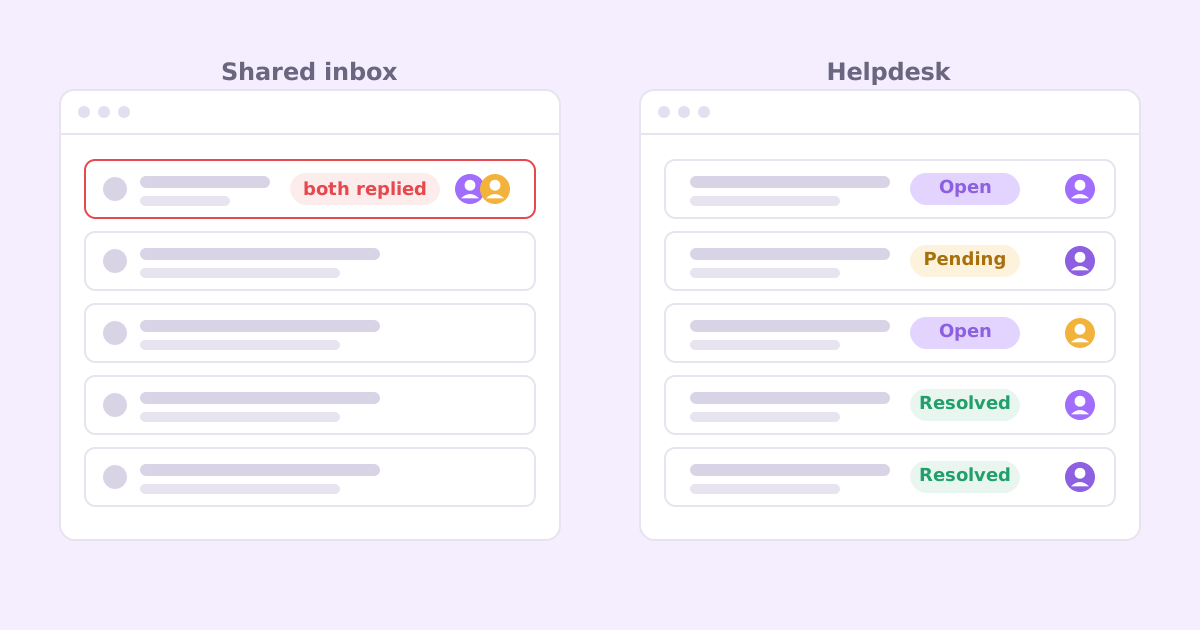
Here’s the moment most small teams realize they have a problem. A customer replies to a thread with “thanks, but your colleague already told me the opposite.” Two of you answered the same email, ten minutes apart, with different advice.
So, shared inbox vs helpdesk? Short answer: a shared inbox (a support@ address everyone can see in Gmail or Outlook) is fine while one person handles support and volume is low. A helpdesk is worth it once two or more people answer customers, you add a second channel like chat, or things start slipping through the cracks. The difference isn’t really features. It’s whether every conversation has a clear owner and a clear status.
Let’s go through what each one is good at, where each one hurts, and how to pick without overbuying.
What is a shared inbox for customer support?
In the simplest version, it’s one email address (support@yourcompany.com) that more than one person can read. You set it up as a Google Group with a collaborative inbox, a Microsoft 365 shared mailbox, or just forward it to a couple of personal inboxes.
There’s a middle category too: tools like Front, Missive or Hiver that sit on top of your email and add assignment, comments and collision warnings while still feeling like an inbox.
What a plain shared inbox does well:
- It’s free or close to it. You already pay for email.
- Zero learning curve. Everyone knows how to reply to an email.
- Replies look personal. Customers get an email from a person, not a ticket number.
- No migration. Nothing to set up, nothing to export later.
For a solo founder with a handful of emails a day, this is the right answer. I’d push back on anyone telling you to buy a helpdesk before your first hundred customers. Your time is better spent on the product.
What is a helpdesk, and what does it add?
A helpdesk treats every incoming message as a conversation (or “ticket”) with a state. It’s open, pending, or resolved. It belongs to someone. It has a history attached: previous conversations with this customer, internal notes, tags.
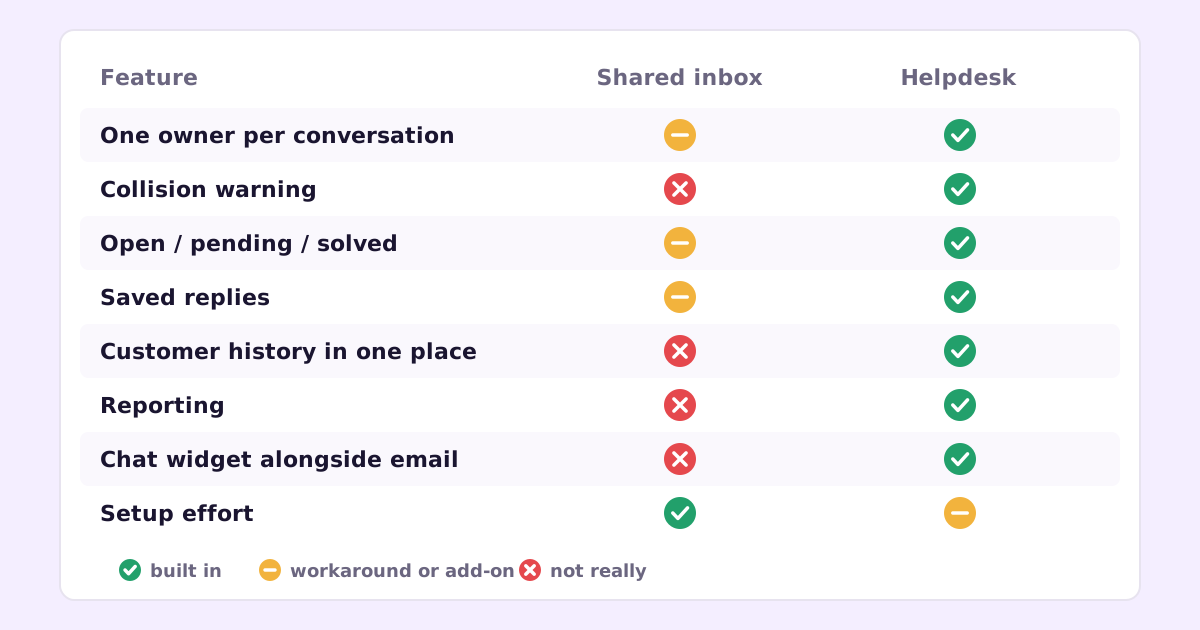
The extras that matter most for a small team:
- Assignment. Every conversation has one owner. “I thought you had it” stops being a thing.
- Collision detection. You see that someone else is already typing a reply.
- Status. Open, waiting on customer, resolved. You can see at a glance what still needs work.
- Internal notes. Discuss a ticket next to the ticket, not in Slack where the context gets lost.
- Customer history. See the last three conversations with this person before you reply.
- Saved replies and macros. A starting point for the answers you give every week.
- Multiple channels in one place. Email, live chat, a web widget, sometimes social, all in the same queue.
- Reporting. How many conversations came in, how long they waited, which topics are growing.
The costs are real too. A helpdesk is another tool to learn, another monthly bill, and another place customer data lives. And some helpdesks make replies feel like a ticketing system (“Your request #48213 has been received”), which a small company doesn’t need to do. Most let you turn that off.
Where a support@ inbox breaks down
A shared inbox doesn’t fail all at once. It fails in small ways that add up.
Double replies. Two people see a new email, both answer. The customer gets two different responses and trusts neither.
Dropped threads. Everyone assumes someone else will reply. Nobody does. The customer waits three days and then posts about it.
Lost context. Someone answers a follow-up without seeing the earlier thread, or without knowing this customer already had the same bug last month.
Archiving as a status. In Gmail, “done” means archived. But was it archived because it was solved, or because someone meant to come back to it? You can’t tell.
No idea what’s going on. How many support emails did you get last month? Which topics? How long did people wait? With a plain inbox, the honest answer is “I don’t know.”
The second channel. The moment you add live chat to your site, you have two inboxes to watch. Things fall between them.
You can patch some of this with labels, filters and a shared spreadsheet. People do. It works for a while, and then it becomes a part-time job to maintain.
Signs it’s time to move from a shared inbox to a helpdesk
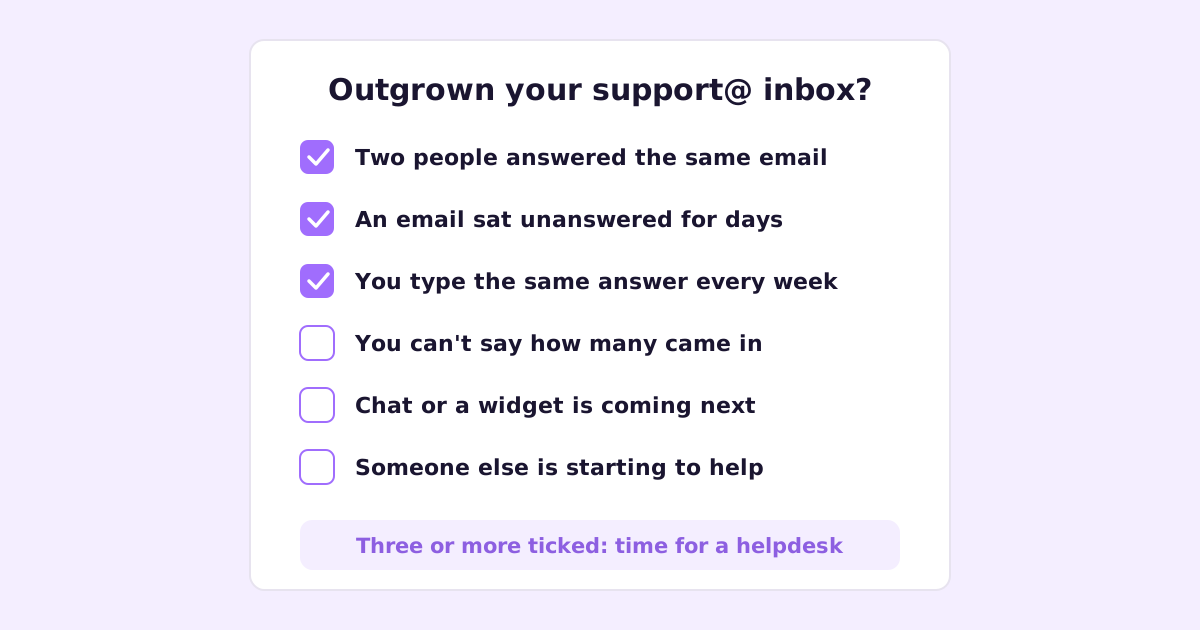
Go through this list. If three or more are true, it’s time.
- Two people have answered the same email in the last month.
- An email sat unanswered for days because everyone thought it was covered.
- You type the same answer more than once a week.
- You can’t say roughly how many support conversations you got last month.
- You’re about to add chat or a website widget.
- Someone other than you is starting to help with support.
- You’ve started a spreadsheet to track which emails are open.
That last one is the clearest signal. If you’re building a helpdesk out of a spreadsheet, you need a helpdesk.
Helpdesk for small business: what to look for
You don’t need enterprise features. You need a few things to be good:
- It still feels like email to the customer. Replies come from a person’s name, threads stay threaded, no ticket-number spam.
- Assignment and collision warnings that just work. This is the core reason you’re switching.
- Saved replies you can edit before sending. Not auto-replies. Starting points.
- Tags you’ll actually use. Five or six, not fifty. “bug”, “billing”, “how-to”, “feature-request” covers a lot.
- A help center, or a clean way to link one. Many tickets should become articles.
- Fair pricing for a small team. Per-seat pricing gets expensive fast if you want everyone (including engineers) to see tickets.
- Your data is exportable. You may switch again one day.
The usual options
Fair summary of the common choices, as I see them:
- Help Scout. Built around the idea that support should feel like email. Good fit for small teams who care about tone.
- Zendesk. Very capable and very configurable. Can feel heavy for a team of two.
- Intercom. Strong on chat and in-app messaging. Pricing has a reputation for climbing as you grow.
- Front. A shared inbox on steroids. Great if support is mixed in with sales and ops email.
- Freshdesk, Zoho Desk, Gorgias and others fill specific niches (Gorgias is popular with ecommerce).
Try two at most. Import a week of real email into each and answer from it for a few days. You’ll know quickly which one fits how you work.
A middle path: shared inbox plus discipline
If you’re not quite ready for a helpdesk, you can stretch a shared inbox a long way with a few rules:
- One person owns support each day. Others don’t reply unless asked. This alone kills double replies.
- Use labels as statuses. “Waiting on customer”, “Needs engineering”, “Done”. Archive only from Done.
- Saved replies (Gmail calls them templates). Write the five you need most.
- A weekly ten-minute review. Scroll the week’s emails, tag topics, write down the top three questions.
- Link to help articles in your replies. Which means writing them. More on that in how to reduce support tickets without hiring.
This works well for a solo founder or a two-person team where one person does nearly all of the support. It stops working the day two people share the load evenly.
Where AI fits in either setup
Whichever you choose, AI-drafted replies are becoming normal. The useful version reads your help articles, past answers and the customer’s account details, writes a draft, and a person checks and edits it before it goes out. The bad version guesses and sends.
It matters less which inbox you use than what the AI is grounded in. If your help content is thin or out of date, drafts will be vague. I wrote about this in detail, with a sample email and two replies, in how to use AI for customer support replies without sounding like a bot.
What we’re building
Ellie Desk is our take on this: a shared support inbox for email, chat and a web widget, with replies drafted from your knowledge base, past tickets and (if you use Ellie Docs) your published help center. You review, tweak and send. When a ticket is resolved, one click drafts a help article from it, so the answer is public for the next person.
It’s aimed at exactly the moment this post describes: you’ve outgrown support@, but you don’t want an enterprise helpdesk. If you’re setting all this up from scratch, the customer support setup guide for small SaaS walks through the whole thing in order.
Common questions
Can I use a shared Gmail inbox as a helpdesk? Up to a point. With labels, templates and a strict “who’s on support today” rule, a shared Gmail inbox handles low volume with one or two people. It doesn’t give you collision warnings, real statuses or reporting, which is usually what pushes teams to switch.
Is a helpdesk overkill for a startup? Before you have regular support volume, yes. Once two people answer customers or you add live chat, no. The cost of a helpdesk is usually less than the cost of one angry customer who got ignored.
What’s the difference between a shared inbox tool like Front and a helpdesk like Zendesk? Front feels like email with team features added. Zendesk feels like a ticketing system with email as one channel. For customer support specifically, both work. Pick based on whether support is mixed in with other email (Front style) or separate (helpdesk style).
If your support@ inbox is starting to creak and you want a helpdesk that drafts replies from your own docs, join the Ellie Desk early-access list.